Using Prompt AI to Help Setup Data Analysis

I used Claude to build an application that loaded data for me. However, there were a few others things I needed done to help me get the data ready for analysis. I could have used Claude (or another human), but this was a place I’d need to do a lot of directing.

I did, however, use Prompt AI to help me get this moving quicker and start some analysis. This post covers the way I got assistance inside SSMS from Prompt AI.

This is part of a series of posts on SQL Prompt. You can see all my posts on SQL Prompt under that tag. This is part of a series of experiments with AI systems.

Adding New Structures

As a part of my data analysis, I needed to tag sessions with topics. This wasn’t really done as a part of most SQL Saturday events. While there might be tracks, often the sessions aren’t categorized with tags. It’s a pain, most organizers and most speakers don’t want to bother.

Plus, search works well on a website. For data analysis, not so much.

I decided to use Prompt AI to help a bit at this point, since I was low on credits.
I asked it to add a structure. Possibly I could have written the code in not much more time than it took for this prompt, but here I get to let an assistant take a stab and then critique the work. Here’s my prompt to SQL Prompt AI:
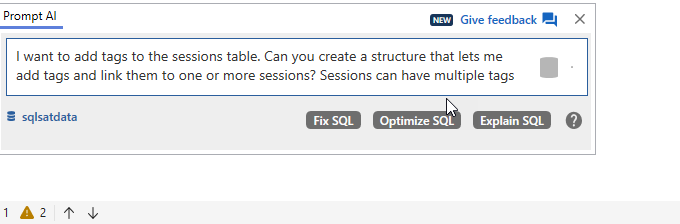
2025-12_0118

Here are the results. This has the PKs, FKs, and indexes, some of which I might have forgotten. I don’t love names like “description”, but that’s fine. I could easily fix that.

-- Create a table to store tags
CREATE TABLE dbo.Tags
(
    TagID INT IDENTITY(1, 1) PRIMARY KEY,
    TagName NVARCHAR(100) NOT NULL,
    Description NVARCHAR(500) NULL,
    CreatedDate DATETIME
        DEFAULT GETDATE()
);

-- Create a junction table to link sessions with tags (many-to-many relationship)
CREATE TABLE dbo.SessionTags
(
    SessionID INT NOT NULL,
    TagID INT NOT NULL,
    PRIMARY KEY (
                    SessionID,
                    TagID
                ),
    CONSTRAINT FK_SessionTags_Sessions
        FOREIGN KEY (SessionID)
        REFERENCES dbo.Sessions (SessionID),
    CONSTRAINT FK_SessionTags_Tags
        FOREIGN KEY (TagID)
        REFERENCES dbo.Tags (TagID)
);

-- Create index to improve query performance
CREATE INDEX IX_SessionTags_TagID ON dbo.SessionTags (TagID);
CREATE INDEX IX_SessionTags_SessionID ON dbo.SessionTags (SessionID);

Now, I need to analyze the data.

Fortunately, Prompt AI helped me. Below this DDL, was a snippet to test my tags. I had this code listed:

SELECT 
     s.SessionID,
     s.Title,
     STRING_AGG(t.TagName, ', ') AS Tags
FROM
     dbo.Sessions s
LEFT JOIN
     dbo.SessionTags st ON s.SessionID = st.SessionID
LEFT JOIN
     dbo.Tags t ON st.TagID = t.TagID
--WHERE Title LIKE '%n rds%'
GROUP BY
     s.SessionID, s.Title;

I used this to check my tags, which were non existent at this point, so I had all NULL values in the Tags column. Fortunately, I know how to write some code, so in another window I wrote this code, which inserts data, but doesn’t create dups since I might have dups based on my LIKE clause catching the same session twice.

I also get the list of current tags, so I could change the number used in the insert as needed. There are more elegant ways to do this, but I wanted to get something done.

INSERT dbo.SessionTags
(
     SessionID,
     TagID
)
SELECT SessionID, 10
FROM sessions WHERE Title LIKE '%n rds%'
   AND sessionid NOT IN (SELECT sessionid
        FROM dbo.SessionTags
     WHERE TagID = 10)

SELECT @@rowcount
GO
SELECT top 30
  *
  FROM dbo.Tags

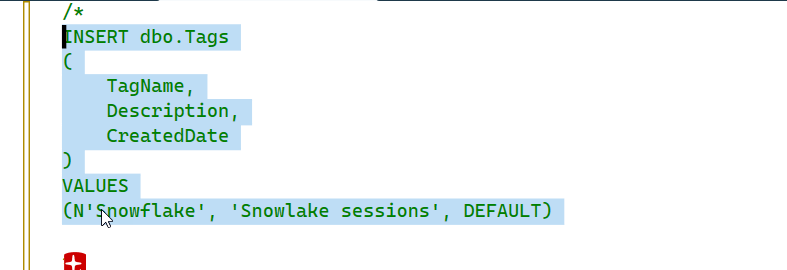
There was a sample INSERT statement for tags as well, so I modified it to use tags I cared about. Then I started running my test query to look for NULL values and start filling them in.

Here’s a look at a run. I’ve added some tags, but there are some nulls. There are also multiple tags for some sessions. I added the description field as well, but for most of the data, this doesn’t exist, so I don’t have it. Yet. That’s another project.
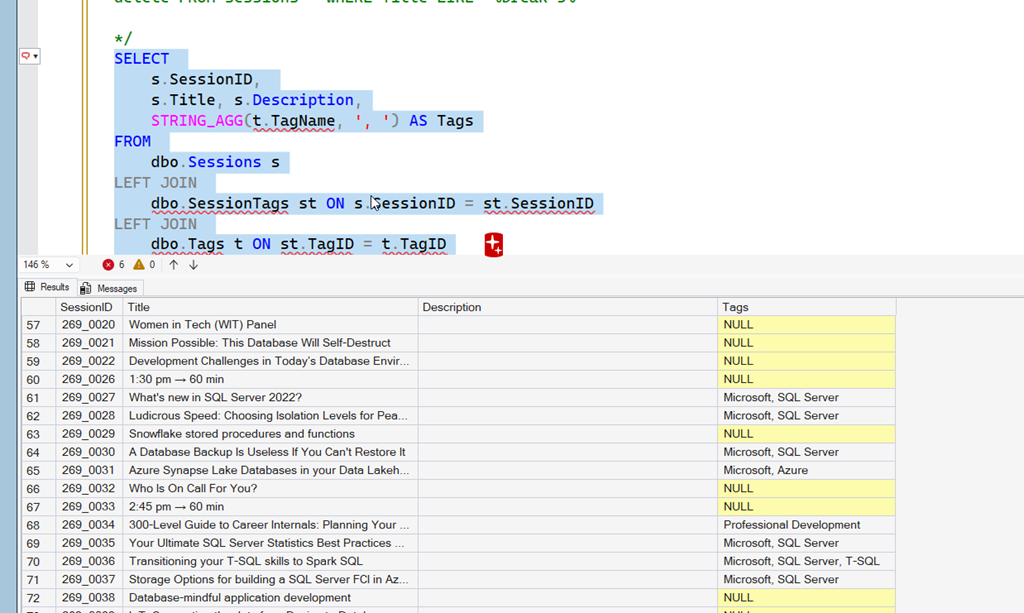
2026-01_0130

Line 63 is for Snowflake, which isn’t a tag. So I edit my commented out code to include Snowflake and then execute it. This is commented, so as I hit execute it doesn’t run automatically.
2026-01_0131

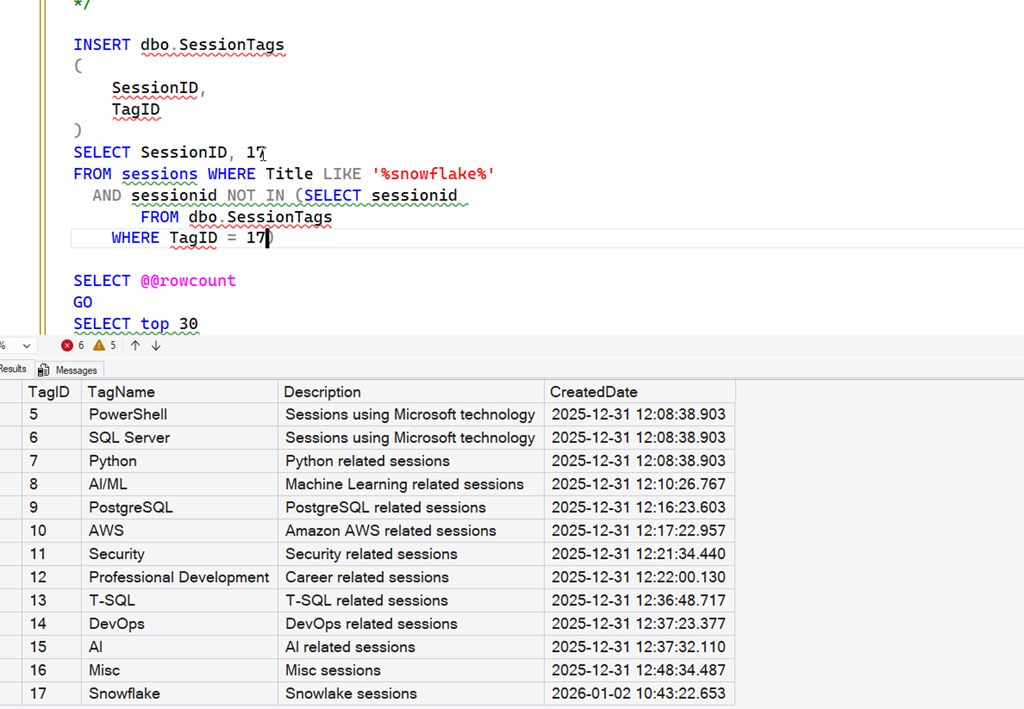
Now I get a list of tags and use that to edit my numbers in the SessionTags insert statement. In this case, Snowflake is number 17, so I change the insert to that, and edit the LIKE statement. This will add that tag to all sessions with Snowflake in the title.
2026-01_0132

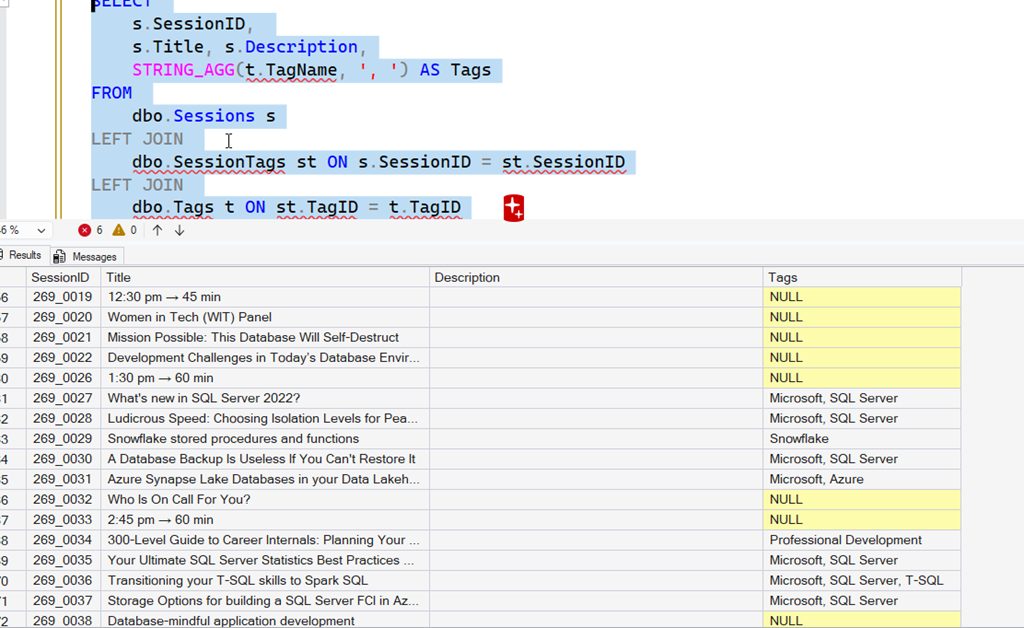
I repeated this for a number of sessions. Below, I’ve re-run my tag query and now we see Snowflake is added.
2026-01_0133

Why I Didn’t Use an AI for This

I built an application that loaded this data with Claude Code. I could have asked Claude to add the tags as well, but I didn’t have any data to put in there. I wasn’t even sure what I would do, especially as a lot of these sessions aren’t really sessions. Notice the timings above, the breaks, the panels, etc. There are also lunch breaks and other items that aren’t really sessions.

Claude could have cleaned this data. However, I want to be sure of what I’m removing. Having Claude write the delete (or run a select first) and then ask me what to do doesn’t seem to be a good use of its cost or my time.

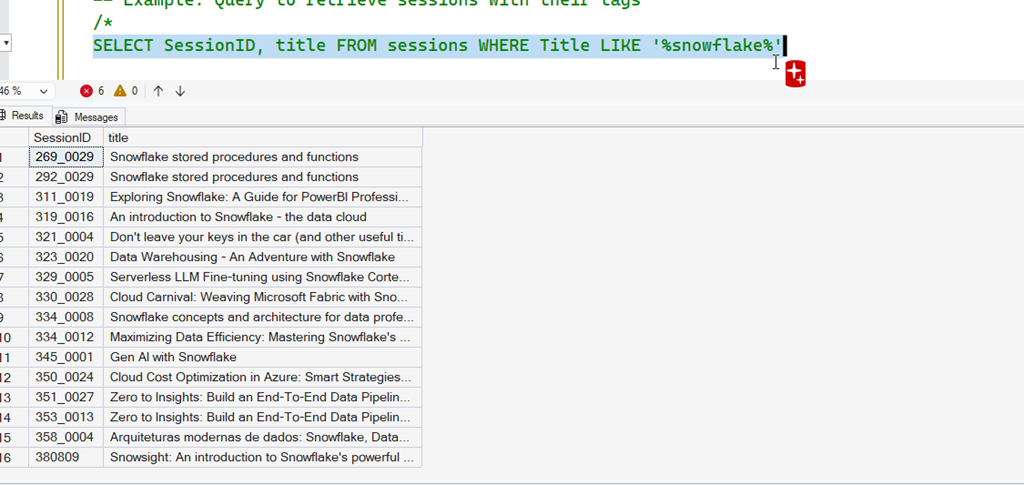
I still need to be the human in the loop. There were some times I ran a select for certain words and then check the list before adding the tags. For example, here was what I did for Snowflake.
2026-01_0134

All those are good, but when I ran a search for Agent, I found mostly AI based results, but a few were SQL Agent sessions. Tagging those as AI wouldn’t make sense, so I had to find a better way to update the data I needed updating.

Summary

Prompt didn’t do a lot here, but it did quickly get me moving on the task I was focused on rather than the details to support it. I could have written the DDL, but it would have taken focus away from me in thinking about tags. This did as good a job as I could do, or more importantly, as good a job as I needed.

It also gave me a query and insert statement to get moving, again, reducing my mental load. I could have written that query, but I would have spent a few minutes doing it rather than thinking about how to assign tags.

Ultimately I think this was a good use of AI, saving my time and energy, allowing me to focus on the task I was trying to accomplish without distraction.
Posted in Blog | Tagged , , , , | Leave a comment

Minimally Viable Security

Security has been a constant concern for many IT professionals over the years. Many of us are trying to implement better security controls, and yet at the same time, we try to avoid anything that slows us down. Security clearly hasn’t been a big enough concern, as we’ve had more than our share of SQL Injection issues. These often come about from poor practices, lack of education, and too many people not learning to adopt better habits across time.

We’ve also had no shortage of lost backups, open cloud buckets, and more over the years. While security (or cybersecurity) is listed as a concern for tech management, they are quick to avoid slowing down any development or deployment of software. While it is easier to get time for patching these days, it’s still not easy. There are plenty of organizations that prioritize resources spent on tasks other than patching, upgrading systems, or training developers.

One of the ideas in modern software development is to often build an MVP, a minimally viable product, where we can test ideas and determine if our solution is worth pursuing. This could be a greenfield application, or even a feature enhancement to an existing system. In the age of GenAI, vibe-coding, and more, this might be MCP or agent-based AI additions to software that are being developed and enhanced rapidly, incorporating feedback from customers.

If we allow minimal amounts of features to test things, shouldn’t we have minimal levels of security as well? That’s the thrust of a blog post from Forrester that discusses how we might look forward in 2026 to protecting our digital systems. There ought to be a minimum set of controls, testing, and more that ensures we can build software that doesn’t cost more from security issues than it generates in revenue. This might be especially important in the age of GenAI-coding where we can have less experienced engineers or even helpful agents committing lots of code they expect to deploy to production.

Education is important here to ensure everyone is aware of your MVS (minimal viable security) before they get too far along. It might be especially important in helping others guide their GenAI tools to ensure security is being considered early on. Adding in security requirements as a standard for your tools, such as in a Claude.MD file is a best practice that should be required for all future software development. You never know who might start to add AI coding tools or agents to your codebase, so be prepared now.

Education isn’t enough. It’s too easy for someone to forget what they learned. It’s also easy to assume many people have learned something when they haven’t. To me, part of an MVS is ensuring you have a framework or platform that can test all code and ensure that your systems are being securely built and deployed. This includes third-party software, especially SaaS products, where vendors might be tempted to sell you their own MVP without any MVS.

Steve Jones

Listen to the podcast at Libsyn, Spotify, or iTunes.

Note, podcasts are only available for a limited time online.

Posted in Editorial | Tagged , , | Leave a comment

Monday Monitor Tips: Learning While Using the Tool

A customer was asking about what certain items in Redgate Monitor mean. They have a variety of skills on their staff, and they have developers accessing Redgate Monitor. This post explains how your staff can start to learn a bit more about SQL Server as they use the tool.

This is part of a series of posts on Redgate Monitor. Click to see the other posts.

Tool Tips

There are lots of little tips and documentation available in Redgate Monitor. These have been added with various references to help you learn more about the data collected by Redgate Monitor, as well as assist you in tuning your system for optimal performance.

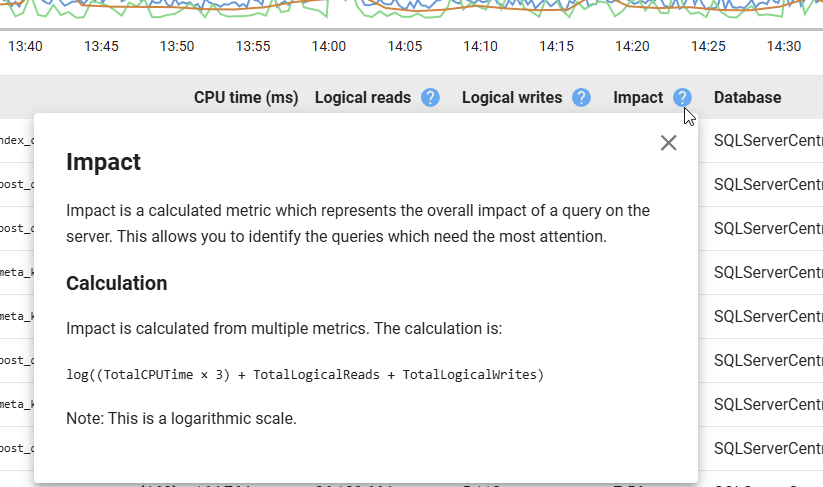
For example, there is an Impact column when I look at a server and see the queries that have run. Next to this is a question mark in a blue circle. Clicking this lets me learn about what this column is and how it is calculated.

2025-12_0281

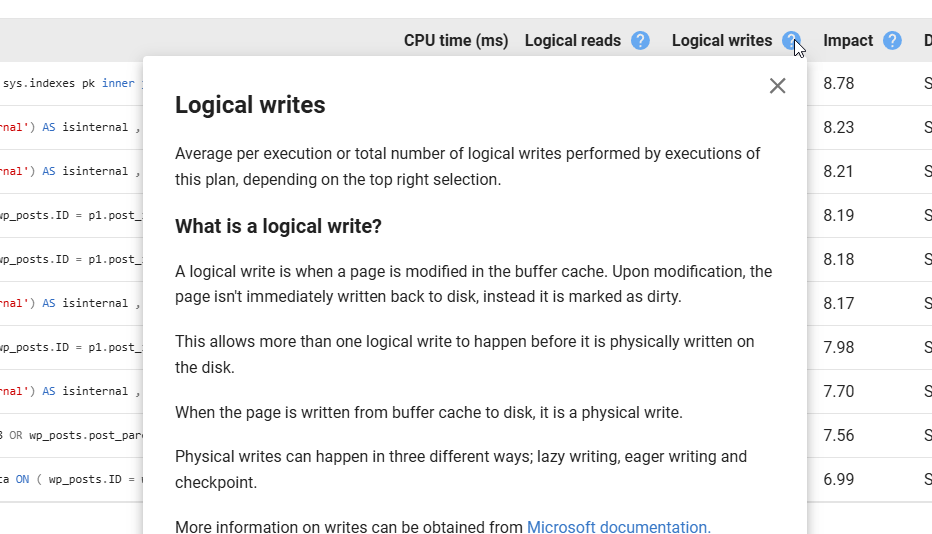
Similary, if I didn’t know what a Logical Write was, I can click this item and see where the data comes from. I also get a link to the Microsoft documentation at the bottom.

2025-12_0282

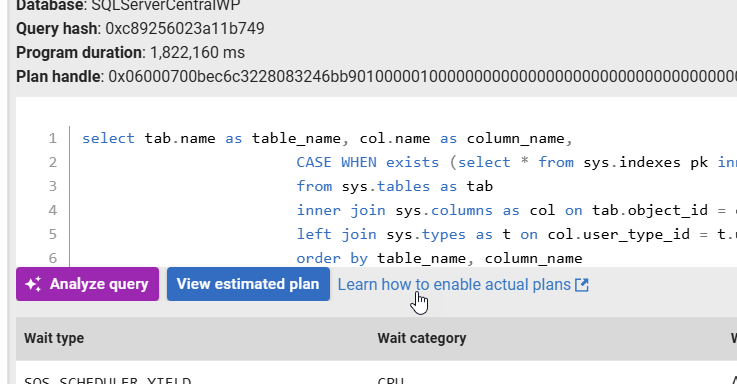
If I want to see actual plans rather than estimated ones, I have a link by the details of a query that sends me to the Redgate Monitor docs.

2025-12_0283

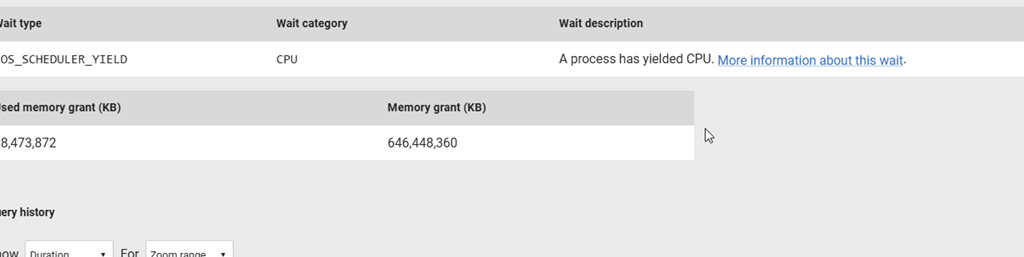
Below this I see waits that are significant. Next to the wait description, I can learn about what this wait means.

2025-12_0284

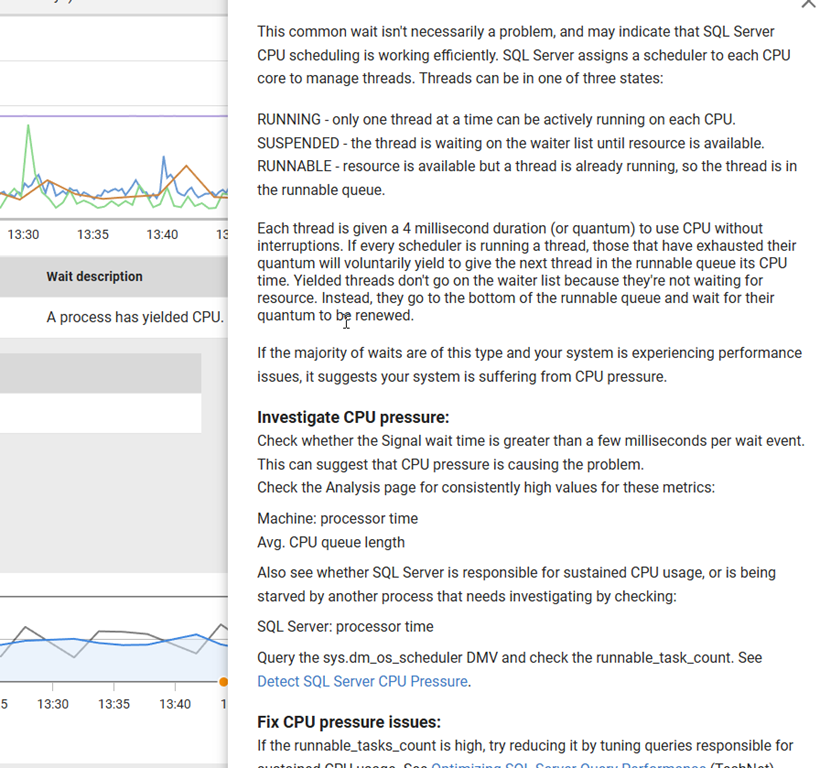
If I click this, I get a long description of what this is and where I might look to investigate this or fix it.

2025-12_0285

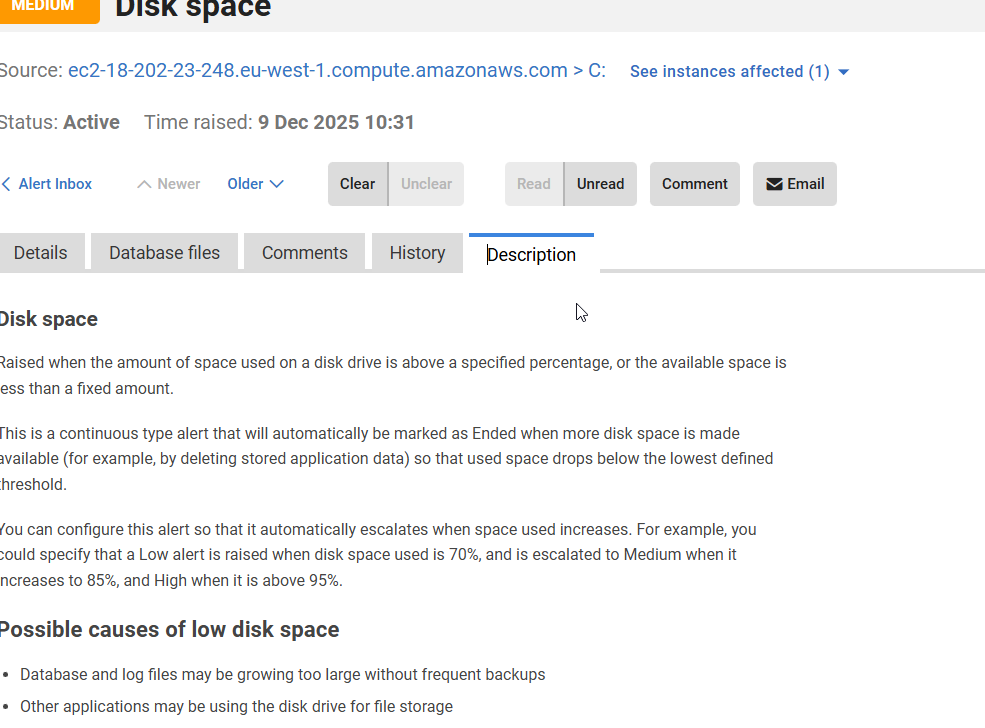
In the Alerts section, there is a description tab for each Alert. If you check this, it explains what this alert is, when it is raised, and potential reasons. Here is the Disk Space alert description

2025-12_0287

Here is the one for Job Failures.

2025-12_0288

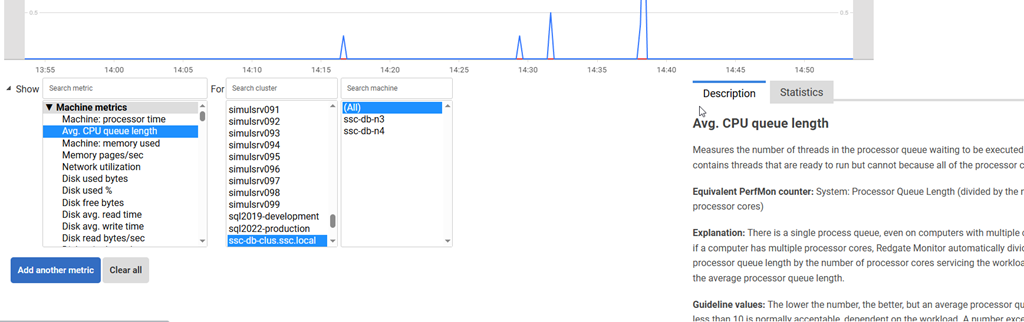
If you are analyzing metrics, we give more details when you select a metric in the Analysis tab. This is handy if here are metrics you don’t understand and want more information without spending time Googling or asking an AI.

2025-12_0289

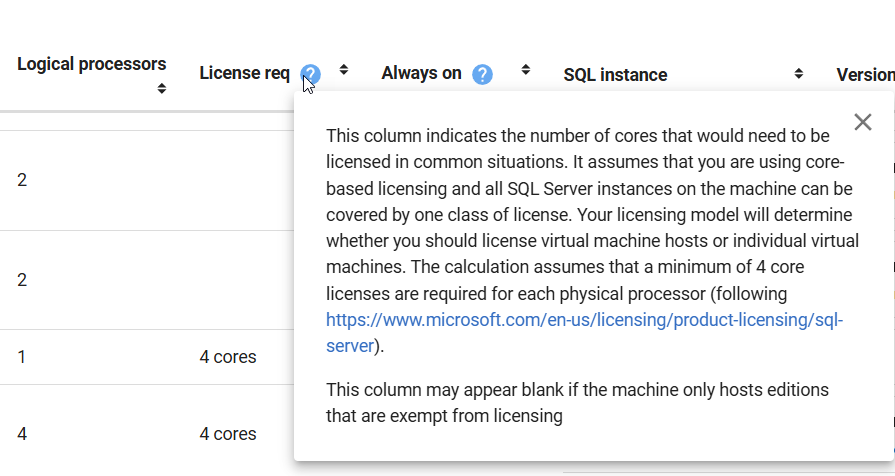
We even have some guidance in the Estate tabs, such as this tooltip on the License Req column. We let you know what we are showing and why, and a link to guidance from Microsoft.

2025-12_0290

Summary

This post shows some of the places where you can learn more about how Redgate Monitor works, or how you should use the data displayed. There are many more places inside the product where you get assistance that helps you get the most out of your monitoring solution.

SQL Server, PostgreSQL, Oracle, and other platforms have become very complex. Redgate Monitor tries to help simplify your workload by giving you a single pane of glass across the cloud, different platforms, and different environments, but it can be hard for anyone to manage an estate.

This post gives you an idea of how Redgate Monitor tries to help you learn, or reminds you, of what you’re seeing.

Redgate Monitor is a world class monitoring solution for your database estate. Download a trial today and see how it can help you manage your estate more efficiently.

Posted in Blog | Tagged , , | Leave a comment

The North Star for the Year

It’s the beginning of the year, and some of you likely have today off. But plenty of you are at work, moving slowly through this Friday at the start of the year—handling busywork, catching up on maintenance you’ve let slide, or preparing for the tasks you know will start coming Monday.

At Redgate, most engineering teams work toward a North Star goal: a high-level direction that guides your various tasks. Perhaps it’s growing a customer base or achieving an overarching product specification. For example (this is completely made up), one North Star might be achieving feature parity across all platforms for SQL Compare.

Many people set New Year’s Resolutions to adjust their behavior for the year ahead. Many of us also need to set work goals—often SMART goals—that support company direction or personal ambitions. I’m setting mine for Q1 right now, though we’re still negotiating the exact items and measures. Some organizations require these in December, others allow January. Some require them multiple times throughout the year.

As we kick off the new year, take a few minutes to think about where you’d like to be at this time next year. What would you like to accomplish? How would you like your career to change before 2027 begins? Whether you formally set goals in your organization, have them assigned to you, or pursue personal aims, the first Friday of the year is likely slower than most—making it perfect for reflection.

Think about your career, your ambitions, and your future direction. Let your dreams and desires guide you.

Set that North Star today and keep it in mind as you move through 2026. It might help guide you toward a better career.

Steve Jones

Listen to the podcast at Libsyn, Spotify, or iTunes.

Note, podcasts are only available for a limited time online.

Posted in Editorial | Tagged | Leave a comment